


For an Abu Dhabi Bus Card Balance Check, you can use the official Hafilat services provided by Abu Dhabi Mobility. A balance can be checked online via the Hafilat service or via an authorised Hafilat machine. The Hafilat smart card is used to pay for bus trips, so it is important to have sufficient money on the card before travelling. Customer Happiness Centres are also available to help passengers requiring assistance and are available through Abu Dhabi Mobility as Hafilat services. When your balance is low, you can recharge your card from the official Hafilat channels. Before you travel, check your balance on your card to avoid payment problems with your Hafilat card.
Hafilat balance check at a glance
| Detail | Current information |
| Card name | Hafilat Smart Card |
| Transport authority | Abu Dhabi Mobility |
| Online Hafilat service | hafilat.darb.ae |
| Physical checking options | Sales and recharge machines and Customer Happiness Centres |
| Bus card use | Tap when boarding and alighting |
| Online recharge reflection | After 2 hours |
| Machine recharge reflection | Immediately |
| Maximum stored recharge | AED 150 |
| Local bus fare | AED 2 |
| Regional fare | AED 2 + 5 fils per km |
The maximum amount that can be credited on a Hafilat card is AED 150 and the fare details it currently has are AED 2 for local trips and AED 2 plus 5 fils per kilometre for regional trips, according to Abu Dhabi Mobility.
How to check your Hafilat card balance
The official information does not offer a single step-by-step balance screen for all devices and types of cards. But Abu Dhabi Mobility clearly marks the Hafilat website and the actual Hafilat service points as official channels.
Check Hafilat balance online
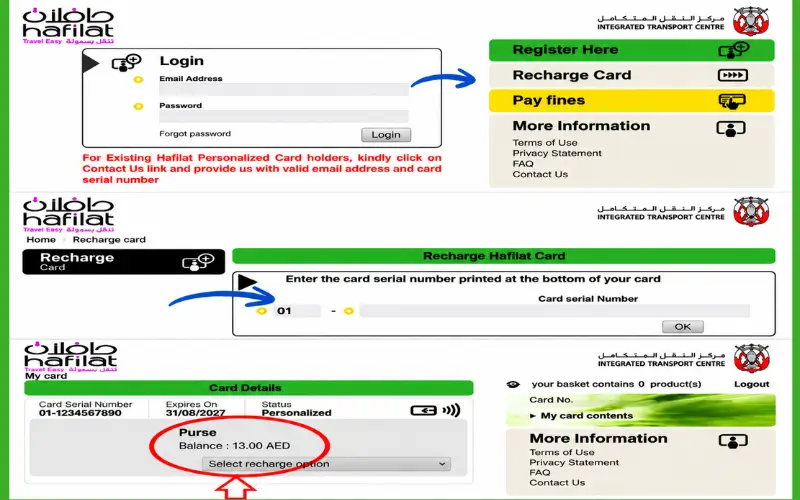
For an Abu Dhabi bus card balance check from a phone or computer, start with the official Hafilat service rather than a third-party website.
Abu Dhabi Mobility links to hafilat.darb.ae from its Hafilat information page and identifies the website as the online channel for Hafilat balance/recharge services.
To use the online service:
- Open the official Hafilat service at hafilat.darb.ae.
- Follow the Hafilat card service as illustrated on this page.
- Fill in the card details that the official system asks for.
- Check out the balance or card information shown.
- If you are adding money too, then recharge via the official service.
It is best to follow the current interface, as it may change as the government service is updated, rather than use screenshots or old instructions that were published on an independent website.
Use a Hafilat sales and recharge machine
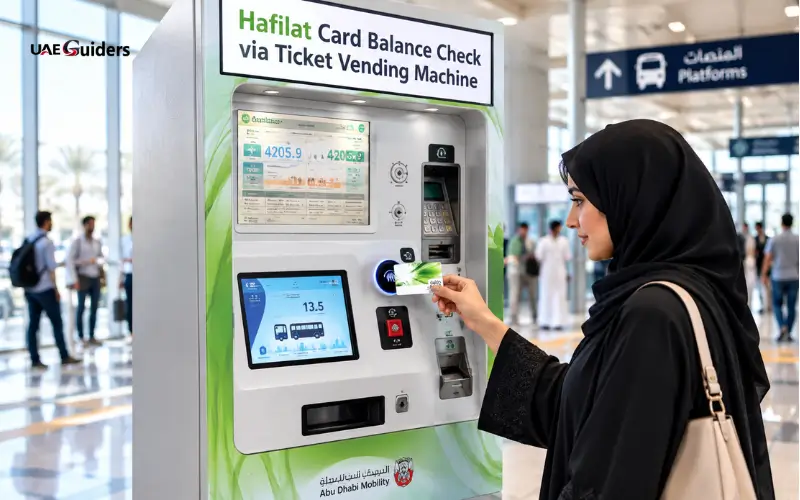
If you are on the road, or are not keen on relying on an online service, then a physical machine can help.
Abu Dhabi Mobility states that the sales machines and recharge machines (TVMs) are set up in bus stations and bus stops. The balance is credited to the card instantaneously when using these machines, according to the authority.
Bring your Hafilat card to the machine and follow the instructions on the screen to use the card services. The machine can also be used for adding balance.
This can be very helpful if you need to confirm your card, but not for online transactions that may still be pending.
Check the card at a recharge machine
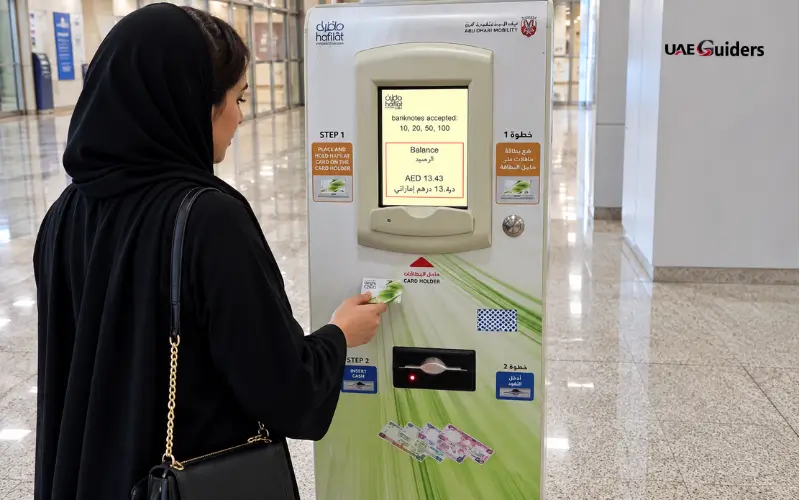
Recharge machines are an official list of Hafilat services channels provided by Abu Dhabi Mobility. The authority notes that the balance is reflected straight away upon use of this channel; these machines are installed at bus stations, bus stops and shopping centres.
When you’re close to one of these machines, it offers a handy alternative to using a mobile app or data to control your card.
Check the balance while using the bus
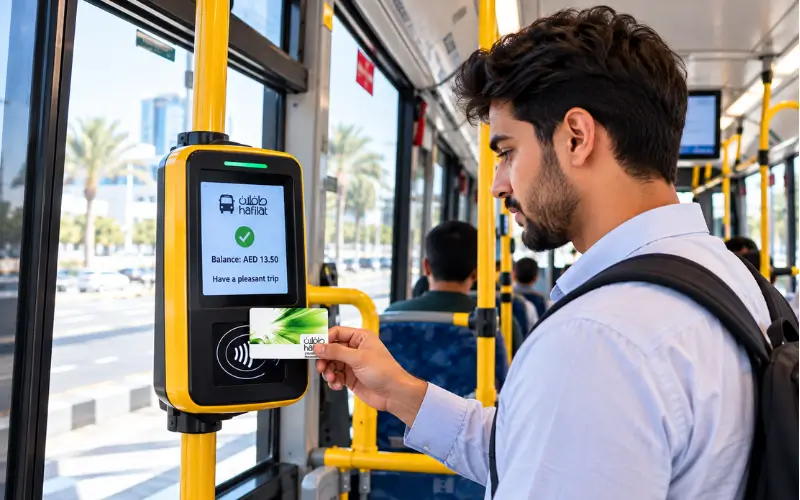
Reading and disembarking passengers are a part of the normal boarding and alighting process and do not constitute harassment.
Abu Dhabi Mobility encourages passengers to ensure their card’s balance before boarding, tap when boarding and disembarking and check the balance before getting off the bus.
This can’t be just a payment machine. It is a natural part of the card travel process and may aid a passenger during the journey to view the remaining balance on the card.
For an Abu Dhabi bus card balance check, however, passengers should not rely only on the bus if they already suspect that their balance is too low. Always check before travelling so that you have time to charge the card.
Customer Happiness Centres

Abu Dhabi Mobility has listed Customer Happiness Centres as an official Hafilat service channel in case your card is not reading properly, you need some help with a transaction, or you just prefer to have someone helping you.
The authority states that the balance added to the machine in a Customer Happiness Centre will be immediately reflected and the centres can be found at the bus stations.
In cases of a card problem, an in-person centre may be more helpful than repeatedly attempting to access an online page to perform an Abu Dhabi bus card balance check. Bring the physical Hafilat card with you, so that staff can identify the card and transaction.
Also, in Hafilat information, Customer Happiness Offices are established in bus stations and at the airport for services related to Hafilat.
Types of Hafilat Cards in Abu Dhabi
The different types of Hafilat cards are based on Abu Dhabi’s public transport usage. There are two types of cards: anonymous and personalized Hafilat cards.
Anonymous Hafilat Card
The Anonymous Hafilat Card is an ordinary Hafilat card that one can buy without personal registration. The cost of this is AED 10 and it can be loaded with any balance and qualified public transport passes.
Personalized Hafilat Card
The passenger’s personal information is used to register the Personalized Hafilat Card. It can be topped up with a balance and 7-day or 30-day public transport passes and subsidies are available for annual passes for eligible users.
What happens after you recharge Hafilat?
Perhaps the most critical information for Hafilat is that, sometimes, a successful recharge will not show up on the physical card right away.
Currently, Abu Dhabi Mobility offers various reflection times based on the type of recharge. The balance on the website and MBME is listed as 2 hours and the balance shown at sales and recharge machines and Customer Happiness Centres is reflected as a result of the balance.
| Recharge method | When balance is reflected |
| Sales and recharge machine | Immediately |
| Recharge machine | Immediately |
| Customer Happiness Centre | Immediately |
| MBME recharge machine | After 2 hours |
| Website | After 2 hours |
This is important if you’ve already paid online and your actual card is still showing a different balance. The authority’s published information states that the specified two hours should be allowed for website/ MBME transactions.
Never assume that the payment was unsuccessful; don’t pay a second time just because the balance has not been posted on the card.
Why checking the balance before boarding matters
The Abu Dhabi Mobility details that passengers should ensure they have sufficient balance prior to boarding for at least one trip. It also requires passengers to tap the Hafilat card upon entering and exiting the bus.
The fare is based on the distance between the stop where you get on and the stop where you get off. Abu Dhabi Mobility also says that if you don’t tap out, the amount of the bus trip will be deducted the next time you use the bus, even if you switch to another one.
This is why checking your balance can be a good idea even when you’re about to run out of money on your card. It can also be used to verify the amount of credit left on the card prior to embarking on a journey.
Hafilat fares and balance requirements
How much to have on your card depends on the kind of trip.
At the moment, the Abu Dhabi Mobility website shows a local fare of AED 2. The published fare on regional trips is AED 2 plus 5 fils per kilometre.
The official page also has weekly and monthly passes:
- Weekly Pass: AED 30 for 7 days from the date of purchase.
- Monthly Pass: AED 80 with a valid duration of 30 days from the date of purchase only.
The local trips and trips to Al Dhafra via Abu Dhabi and Al Ain listed by Abu Dhabi Mobility are covered by these passes.
Fares and products are subject to change; please refer to the latest information on the Abu Dhabi Mobility website before using any fare tables from other websites.
Hafilat card validity and stored balance
Balance is just one aspect of making use of a Hafilat card.
For now, Abu Dhabi Mobility claims that the maximum amount that can be credited to the card is AED 150 and the recharged balance is valid for three months from the recharge date. The authority further says the balance can be triggered before the expiry date with the card by using it for travel or tapping it on sales/recharge machines.
It is useful to be able to differentiate between what is displayed as the stored value and the overall condition of the card, passes, or permits.
Weekly and monthly public transport passes may also be included in Hafilat products and there may be further products and permits available depending on eligibility in personalised cards.
Hafilat balance problems and solutions
If a balance check fails, it doesn’t necessarily indicate a card issue. This could be a problem with the method, timing, or the physical card.
Online recharge has not appeared
Abu Dhabi Mobility claims the balance will show after 2 hours if recharged via the website. Do not consider it a failure until after this time.
Payments that are not correct following the published processing time should be retained and assistance should be requested from an official Abu Dhabi Mobility channel.
Machine recharge is not showing
Balances from sales and recharge machines are recorded instantly, the authority says.
Do not make repeated payments until you have determined if a machine transaction was successful if it doesn’t appear as you would have expected.
Your Hafilat card is not working
When a card is not working, it is more suitable to try it at the service point rather than repeatedly trying the same transaction.
Abu Dhabi Mobility is the source of the service locations for Hafilat and states that balances added in the Customer Happiness Centres are reflected in real time.
Bring the actual card and any pertinent transaction information when asking for help.
Is the Darbi app a Hafilat balance-check method?
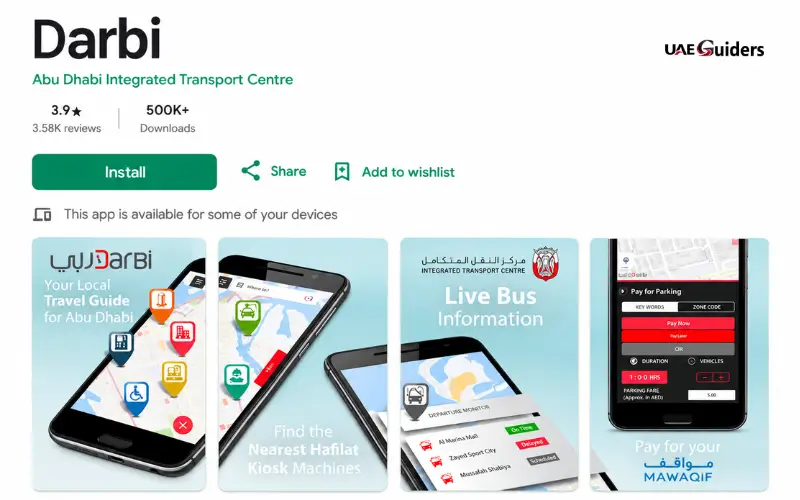
This is a topic about which numerous online articles leave people questioning.
The official Darbi app is an application developed by the authorities of Abu Dhabi to take care of its transport needs. According to its official description in the app store, it offers “transport information” and the ability to top up their Hafilat cards.
The information on the official site of Hafilat, however, directs users specifically to the website service at hafilat.darb.ae. Abu Dhabi Mobility’s published information could not be used to test this and I was not able to find an exact match of the Darbi mobile app’s claimed live Hafilat balance display functionality from the information found on several third-party websites.
If you just need to confirm how much is on the physical card, you can always go with the official Hafilat website and the authorised physical machines to get the information in a proper way and with documentation.
Is Hafilat balance check by SMS available?
There are several sites that say that users can type in BAL, followed by the Hafilat card number, into the number 3009.
I didn’t find this way on the current pages of Abu Dhabi Mobility (official card services). The authority’s current Hafilat pages designate the website, machines and Customer Happiness Centres as service channels.
Therefore, the SMS method should not be made available as an official and verified balance-check service unless it is published or confirmed by Abu Dhabi Mobility.
It is crucial to note this difference when looking online, as two other pages contain the same SMS instructions, but don’t include a current authoritative source.
How to avoid fake Hafilat websites
When you’re searching for Hafilat services, you may stumble upon independent sites which are similar to official government sites. Some even have forms that ask for a visitor’s card number.
To check the balance of an Abu Dhabi bus card, visit the official website of Abu Dhabi Mobility and click on the “Hafilat” service link. The current page on Abu Dhabi Mobility is directly connected to the Hafilat page of darb.ae.
Just a facelift is not sufficient to prove a website is operated by the transport authority.
Don’t enter information on a site unless you’re sure you’ve typed the correct URL. Private Hafilat balances can only be retrieved by independent websites via an authorised service.
Hafilat balance check methods compared
| Method | Internet needed | Physical card needed | Officially documented |
| Hafilat website | Yes | Card information | Yes |
| Sales/recharge machine | No | Yes | Yes |
| Recharge machine | No | Yes | Yes |
| Customer Happiness Centre | No | Yes | Yes |
| Bus reader | No | Yes | Yes, as part of normal card use |
| Darbi app | Yes | Card information for Hafilat services | Hafilat top-up is documented; live balance display is not clearly documented |
| SMS to 3009 | No | Card number | Not verified on current official Hafilat pages |
The comparison between these is displayed and only those methods that are commonly repeated on the Internet are not documented by Abu Dhabi Mobility.
Conclusion
Abu Dhabi Bus Card Balance Check can be done using the official website of Hafilat, the authorised machines, or Customer Happiness Centres for Hafilat users. There is also an official option to recharge the card when its balance is low, provided by Abu Dhabi Mobility. Online recharges may take up to two hours to be updated, but some machine-based recharges may be updated instantaneously. Having sufficient balance on your Hafilat card can prevent payment problems on your bus trip. Don’t forget to press the card when you get on or off the train to ensure that the proper charge is made.
Must Read: NOL Card Balance Check: Official Ways to Check Your Dubai Card Balance
Frequently asked questions
How can I check my Hafilat card balance online?
You can find the official Hafilat service to check your balance here: hafilat.darb.ae.
Where can I check my Hafilat balance without the internet?
Please use an official Hafilat sales/recharge machine or recharging machine to check the balance on your card.
How long does an online Hafilat recharge take?
The time for an online Hafilat recharge can take up to 2 hours to show up on the card.
Does Hafilat balance update immediately at a machine?
Yes. Eligible machines accept balance transfers (that is, the amounts are immediately reflected).
Do I need to tap Hafilat when leaving the bus?
Yes. Use your Hafilat card when getting on and off to note your trip properly.
What is the minimum Hafilat balance required?
Abu Dhabi Mobility recommends having a good balance to take at least one trip before boarding.
Can I check Hafilat balance through SMS?
I cannot confirm the method of BAL to 3009 as an official current Hafilat service.
Can I use the Darbi app for Hafilat?
Darbi has hashat balans card top-ups, but I can’t confirm it has any live balance display.
What should I do if my Hafilat balance is not updated?
Check the time required for the recharge process. If the balance still does not show, please speak to an official Customer Happiness Centre.
How much balance can a Hafilat card hold?
The credit limit for a Hafilat card is AED 150.
What is the Hafilat bus fare in Abu Dhabi?
The fare listed is AED 2 for local trips and AED 2 and 5 fils per kilometre for regional trips.
Where can I get help with my Hafilat card?
You can get Hafilat assistance at Customer Happiness Centres and other official Hafilat service locations.
