


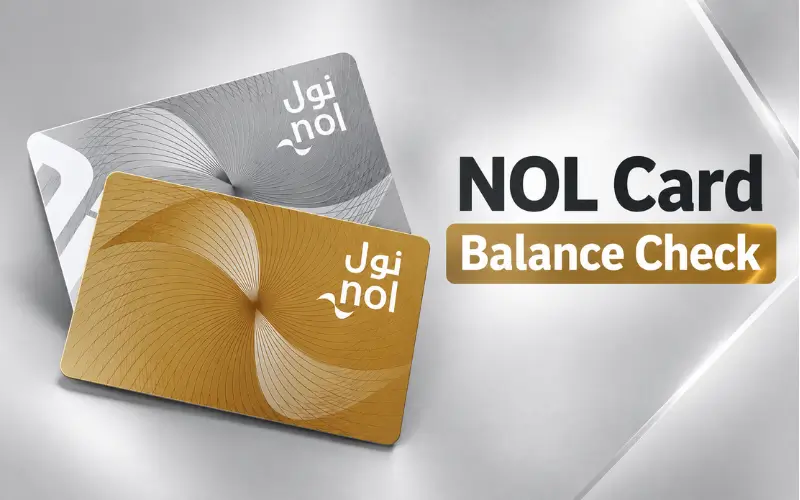
NOL card balance check is quite easy for all who use public transport facilities in Dubai. You may check your balance online on the official RTA website, or through the mobile NOL Pay application. You can also check your balance with your NOL Tag ID on the RTA website, and NOL Pay is capable of reading a physical card with NFC. The cost of using Dubai public transport is at least AED 7.50 for a NOL card. Be aware of your balance before you travel to help you avoid problems at Metro gates, buses, trams, and any other RTA services. The article provides details about the official balance-check procedures, how to top up accounts, and what to do when a top-up has not shown up recently.
Quick Facts
| Detail | Official information |
| Card issuer | Dubai Roads and Transport Authority (RTA) |
| Main online balance method | RTA website |
| Official mobile app | Nol Pay |
| Information needed online | Nol Tag ID |
| Minimum balance for public transport | AED 7.50 |
| Anonymous card maximum balance | AED 1,000 |
| Registered/personal card maximum balance | AED 5,000 |
| Standard Silver card price | AED 25, including AED 19 balance |
| Standard card validity | 5 years |
| Official customer service | 800 9090 |
The figures above are derived from the current RTA service information and should be relied upon over websites that provide balance-check information from third parties.
What Is a Nol Card?
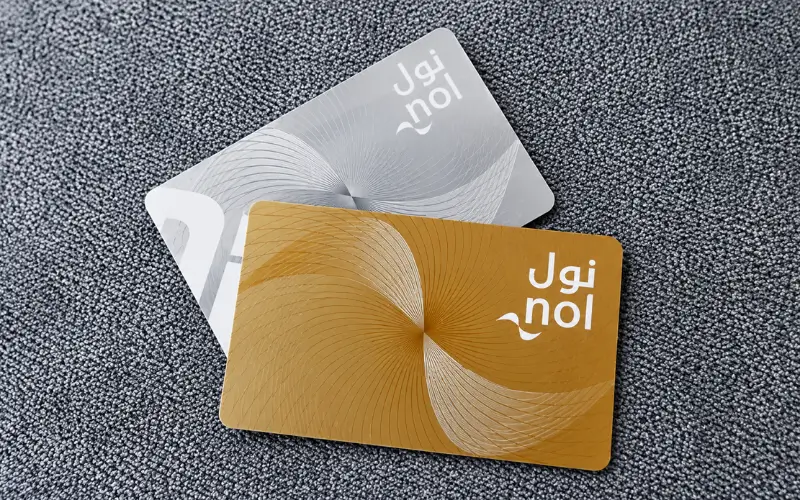
A Nol card is a Dubai smart payment card for public transport and selected non-transport services. According to RTA, it can be used in all modes of transport, including Metro, buses, tram, and marine transport, and Silver, Gold, and personal cards can also be used for RTA paid parking. In addition to the listed retail and other locations, nol can be accepted at participating service and/or card providers.
The card is an electronic purse. Once you have finished a journey, the relevant fare will be automatically deducted from the available balance. On Metro trips, riders swipe in and out, and the fare is deducted based on the zones they pass through. On Metro trips, passengers swipe in and out, and depending on the zones that they traverse, the fare is deducted.
RTA has several Nol products to choose from, such as Silver, Gold, personal/Blue and Red Ticket options. They’re not the same at all: for instance, the Gold card entitles you to travel in Gold Class on the Metro and Tram, whereas the Red Ticket has different rules and is for shorter trips.
This is important if you want to compare your card when using it to check your balance—balance, travel products, and services can vary depending on the type of card you have.
How to Check Your NOL Card Balance Online
For a user who doesn’t wish to install an application, the easiest choice is the official RTA website.
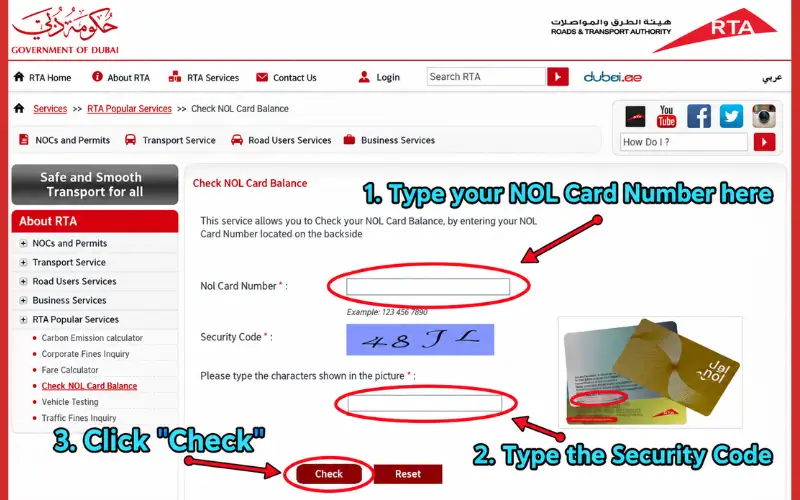
Currently, RTA has a “Check NOL Balance” facility on its website. The form requires the NOL Tag ID, and then a request can be made to verify the Card data.
Step-by-step method
- Visit the official website of RTA Dubai. Go to the official website of RTA Dubai.
- Look for the “Check NOL Balance” section.
- Find your Nol Tag ID on the card.
- Type in the Tag ID in the appropriate space.
- Select Search/Check.
- Check the RTA service’s balance return details.
What is crucial here is to always use the official RTA service and not enter card details into an unknown third-party website. The balance-check feature is available on RTA’s home page.
Where is the Nol Tag ID?
The nol Tag ID is the identifier of the card. It is a number that is required by RTA’s online balance service. Do not guess the Tag ID from another serial number if you do not know which one it is on your card- use the information provided on the official RTA form.
This is especially helpful when traveling and just need to check credit without signing up for another service.
How to Check Your Balance Using the Nol Pay App
If a user is a regular cardholder, the official Nol Pay application offers more comprehensive management of the card.
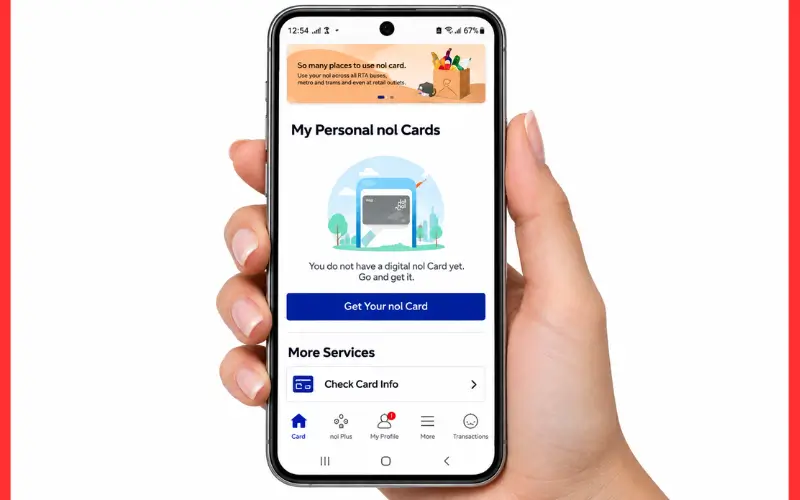
Nol Pay is the official application for Nol services provided by RTA. It can be used to check the balance, top up the card, buy Travel Passes, deal with family cards, and get low-balance or renewal reminders.
If you have an NFC (Near Field Communication) compatible phone, the app is particularly useful. At present, RTA’s instructions enable physical-card users to put the card in front of the NFC section of the phone to enable the application to read the card.
Using a physical Nol card with NFC
If the card is physical, the current RTA process is:
- Wherever required, log in with UAE Pass or RTA account from the Open nol Pay.
- Choose the appropriate nol service.
- Hold the physical card over the NFC area of the phone.
- Read the information on the card that the application displays.
- Look up information or increase the balance on the card using the options available.
RTA expressly declares that physical NOL cards are valid for checking card information, buying Travel Passes, topping up, and some ‘balance-refund services’.
This is more than simply viewing a number. The application may be a central hub for multiple NOL-related services for the regular commuter.
Can You Check the Balance Without an App?
Yes. The online RTA balance feature does not require any NOL Pay.
At the moment, the RTA Home page offers the functionality Check nol Balance, with the user inputting the NOL Tag ID. The RTA’s FAQ also mentions the RTA website and the NOL Pay app as the two ways to check available balance.
But exercise caution when it comes to claims from third-party websites regarding other techniques like SMS codes. There are currently several websites that provide instructions on SMS-based balance checks, although I can’t confirm from current RTA sources that an SMS balance-check service with these instructions is still an officially supported method. That’s why it is safer to use the RTA website or official Nol Pay application.
This is significant as the old transport instructions may stay online for a long time even after the service has changed.
What Is the Minimum Nol Balance Needed for Travel?
As of now, RTA’s condition for using public transport is that a Nol card must have at least AED 7,50 in its account. The minimum requirement is presented on its Metro information as well.
This does not imply that AED 7.50 is the best amount for one’s daily balance.
In the Metro & Tram service information, RTA recommends a minimum amount of AED 15 to be kept on the Nol card.
The difference will help you:
- AED 7.50 — the stated minimum required to use public transport.
- AED 15 — RTA’s recommended amount to keep available as a practical buffer.
Checking the balance before you go out is good sense if you are near the minimum, especially if you will be travelling multiple times.
What Happens When Your Balance Is Too Low?
If the available balance is less than the required amount, you may not be able to begin a public-transport trip.
For instance, RTA says a passenger has to pay a minimum of AED 7.50 for entry into the Metro. The same minimum applies to the use of Nol for public transport in general.
It is advisable, therefore, to check the balance available in the account before getting into the Metro and not find the problem at the gate.
You can top up the balance via a number of channels supported by the RTA in case the amount is not adequate. The minimum top-up varies by channel.
How to Top Up After Checking the Balance
The top-ups can be made using nol Pay, the RTA website, S’hail, Mahboub, ticket machines, authorised sales agents and other approved channels.
An important thing to note is that an online top-up may not be available in real time.
For topping up via the RTA website or by using some of the methods that require a Tag ID rather than NFC, RTA currently states that the topping-up may take up to 45 minutes to 4 hours, and the balance will be activated via an approved device or NFC process.
In contrast, RTA says that the top-ups made via nol Pay using NFC can be loaded immediately after the necessary second tap.
Current top-up differences
| Top-up channel | Current RTA information |
| nol Pay with NFC | Instant after the card is tapped again |
| RTA website | 45 minutes–4 hours, then activation |
| RTA Dubai/S’hail using Tag ID | 45 minutes–4 hours, then activation |
| Ticket machines | Instant |
| Solar top-up machines | Instant |
The differences are why, for example, a user may be able to view the top-up on the card but not use it at once. RTA is particularly aware of the difference between top-up payment and balance activation.
Why Your Top-Up May Not Appear Immediately
One of the pitfalls is assuming that as soon as you pay for a top-up, it becomes active on the physical card.
RTA states that some transactions need to be activated. When ordering top-ups from the website, the customer is required to wait the time specified in the order and then activate the top-up balance with Nol Pay, a Metro gate, a parking meter, or a bus solar top-up machine (as applicable).
RTA also has a specific restriction worth noting – they will not allow bus validators to be used to initiate pending top-ups. The balance must be activated before being attempted on a bus.
If you top up just before your trip, this is one of the most helpful pieces of information to know.
What Can You Do If the Balance Check Does Not Work?
If the RTA site doesn’t return the information that you are expecting, then verify that you typed the correct NOL Tag ID.
Additionally, you should note that it’s a balance problem and not a top-up activation problem. Recently added money might not yet be found; it may still be pending.
NFC could offer another method of engaging with the physical card for app users. RTA’s current Nol Pay service is particularly designed to enable card information verification via the application.
In the event the problem persists, do not use an unofficial website, but use an official RTA support channel. According to the information available on RTA’s website, their customer service phone number is 800 9090.
Can You Check Previous Nol Transactions?
Yes. For personal cards, RTA offers a nol Card Transaction History service, which it defines as the “Summary of the transactions made on a personal card through the channels.
This can be helpful if you’re not just asking “How much money is left?” but “Where did my balance go?”
If, for instance, transaction history is provided, you can delve into whether a recent deduction was made from:
- A trip on a Metro, bus, or tram
- Marine transport
- Parking
- For those who felt no weight loss, the other supported NOL payment.
The transactions available will depend on each transaction and service, and so the transaction-history function should be processed separately from the basic balance enquiry.
How Much Money Can a NOL Card Hold?
Max balance is based on the registration of the card.
As of now, RTA has announced that anonymous NOL cards can be used to store up to AED 1,000, and personal and registered cards can store up to AED 5,000.
For the standard Silver card, RTA quotes AED 25 for it, with AED 19 being the initial balance. The card will expire after five years.
Personal cards offer extra security and access to concession classes. A personal Nol card can be issued for category concession for eligible adults, students, senior Emiratis and residents, and People of Determination, explains RTA.
That is why it may be beneficial for those who use their cards regularly to register for an anonymous Silver or Gold card; according to RTA, registered cards offer additional services and protection for lost or misplaced cards.
NOL Card Balance Check for Tourists and Visitors
Dubai tourists can also indulge in using NOL products. In the current service information, RTA has identified citizens, residents, and visitors as eligible for relevant NOL services.
The Red Ticket is one of the available tickets for shorter visits. According to RTA, it is a “short-term product” that can be reloaded for ten trips or five passes per day, and is valid for 90 days.
Don’t presume that all Nol products have the same action. The Red Ticket contains conditions different from any of the Silver, Gold, and personal cards, so it is important to check the particular card type before using balance or Travel Pass information.
Is Checking the Balance Online Safe?
The best way to do this is to use RTA’s digital services, not any ‘balance checker’ websites.
The official RTA website offers the function of checking balance directly, while nol Pay is RTA’s official application to manage nol services.
Do not enter your card information, UAE Pass, or payment details into an unknown website just because they say that they can check your balance quicker.
Any payments or access to the accounts must be made through official RTA channels.
Best Method for Different Users
You don’t need to use the same technique all the time.
If you only need a quick balance: go to the RTA website and enter the nol Tag ID.
If you use nol regularly: nol Pay is more practical because it combines balance checking with top-ups and other card-management functions.
If you recently topped up online: check whether the transaction needs activation before assuming the money has disappeared. RTA’s current processing rules distinguish between pending and activated balance.
If you have lost a registered or personal card: DO NOT just keep trying to check the balance. RTA offers distinct services for NOL card balances to be blocked and/or refunded.
Conclusion
When travelling to Dubai, a smooth journey begins with a sufficient balance on your NOL card, and a NOL card balance check is the perfect way to verify that before you start your trip. The official RTA website and NOL Pay app offer convenient ways to view your balance and manage your card. With a minimum balance of AED 7.50, you are able to pay the minimum requirements for public transport. If you haven’t topped up recently, some transactions will take a bit longer to process and require a bit of activation. Never use unofficial websites designed to check balances because they are not official RTA services and do not provide accurate information or card security.
Frequently Asked Questions
How can I check my NOL card balance online?
Call the official RTA website’s Check NOL Balance and enter your NOL Tag ID. RTA also validates the balance check via the official NOL Pay application.
What is the minimum NOL card balance for Dubai Metro?
According to RTA, users should have a minimum of AED 7.50 on their NOL card to use the metro.
Can I check my NOL balance without the NOL Pay app?
Yes. There is also a Check NOL Balance facility on the RTA website; therefore, the application does not need to be installed to make a simple enquiry about the balance.
Can I check my NOL balance using my card number?
The NOL Tag ID is requested on RTA’s online balance service. Don’t guess at another number printed on the card that the official RTA form requested.
Why is my new top-up not showing as usable balance?
A channel may be available as a Top-Up Channel at RTA, but they need to be activated after a waiting period. According to RTA, some Top-Up by Tag ID will take 45 minutes to 4 hours to activate.
Can I check my Nol card balance through nol Pay?
Yes. RTA’s official nol Pay app is available to view card details, balance, and more nol services.
How much balance can a Nol card hold?
The RTA is currently proposing that cards can be anonymous for no more than AED 1,000 or registered/personal cards for no more than AED 5,000.
Can I use my NOL card for parking?
Yes. Silver, Gold, and personal NOL cards are accepted for paying for RTA-paid parking, says RTA.
What should I do if my NOL card is lost?
RTA services include blocking cards and requesting balance refunds and balance transfers for eligible registered and personal cards. This process will vary depending on the type of card and the refund method.
Is the SMS balance-check method still officially available?
I cannot confirm that the SMS balance-check instructions that are widely advertised on third-party websites are now being supported by RTA. The website and nol pay method are currently documented by the RTA, and this is the method I suggest using.

3 Comments
Pingback: X28 Bus Schedule: Stops, Route, Fare & Service Details
Pingback: Al Satwa Bus Station: C01, Routes, Fares & Facilities
Pingback: Abu Dhabi Bus Card Balance Check: Hafilat Online & More