


A FAB Balance Check helps customers in the UAE confirm how much money is available in their bank account or salary card. For checking accounts, First Abu Dhabi Bank (FAB) provides digital banking functionality for balance checking and transaction management, whereas Ratibi prepaid cardholders have a separate online balance enquiry functionality.
This will depend on the financial product that you use. You can check the balance on your FAB current or savings account on FAB Mobile or online banking if you have one. Use the prepaid card enquiry portal if your salary is paid to a Ratibi prepaid card. Depending on the services available and your card, an ATM might also permit you to check your card account balance.
FAB Balance Check: Quick Information
| Method | Best for | What you need |
| FAB Mobile app | FAB bank account and eligible card balances | Registered app access |
| FAB Online Banking | Account and card information available online | Online banking login |
| Ratibi balance enquiry portal | Ratibi prepaid salary card | Required card details and verification |
| ATM | Supported debit or prepaid cards | Physical card and PIN, where required |
| Customer support | Problems accessing balance information | Relevant account or card details for verification |
Please note: A Ratibi prepaid card is not a FAB bank account. Select the type of checking that is appropriate for your card or account.
How to Check Your FAB Balance Through the Mobile App

FAB Mobile is a convenient service for customers who do not want to visit their branch or ATM to check the account balance. The official app allows you to manage accounts and cards, view balances and check transaction details.
Follow these steps:
- Install the official FAB Mobile App from your phone’s App Store.
- If you don’t already have the app, you need to register.
- Use the access method you registered with to log in.
- Click on the account/card section you want to open.
- Review the balance that is shown.
- If a transaction history is available, choose the account or card to view the details of the transactions.
Your customer number, your debit card or your credit card number and identity verification might be required when registering. Please follow the instructions inside the official app.
Why Use the Mobile App?
If you are someone who tracks your salary and your daily spending or activity in your bank account, the app is useful for you. It can also assist you in spotting unknown transactions and controlling services supported by cards.
To ensure security, download the app from a trusted app store and verify that the publisher is First Abu Dhabi Bank.
How to Check Your FAB Balance Online
For those who like to use a computer, the bank’s site offers FAB Online Banking. Registered customers can check their account balance and history through online banking.
Steps to Check Your Balance Online
- Click on the official FAB website.
- Click on the appropriate personal banking login.
- Provide your registered credentials and complete any necessary security checks.
- Open the account/card section.
- Click on the appropriate account to view the account balance and transactions.
Never type in your login information if the web address is not correct. Never click on links to log in to a bank account from unsolicited emails, messages, or social media posts.
If a person has not registered for online banking, do not use the same login credentials to access their bank account.
How to Check Your Ratibi Salary Card Balance
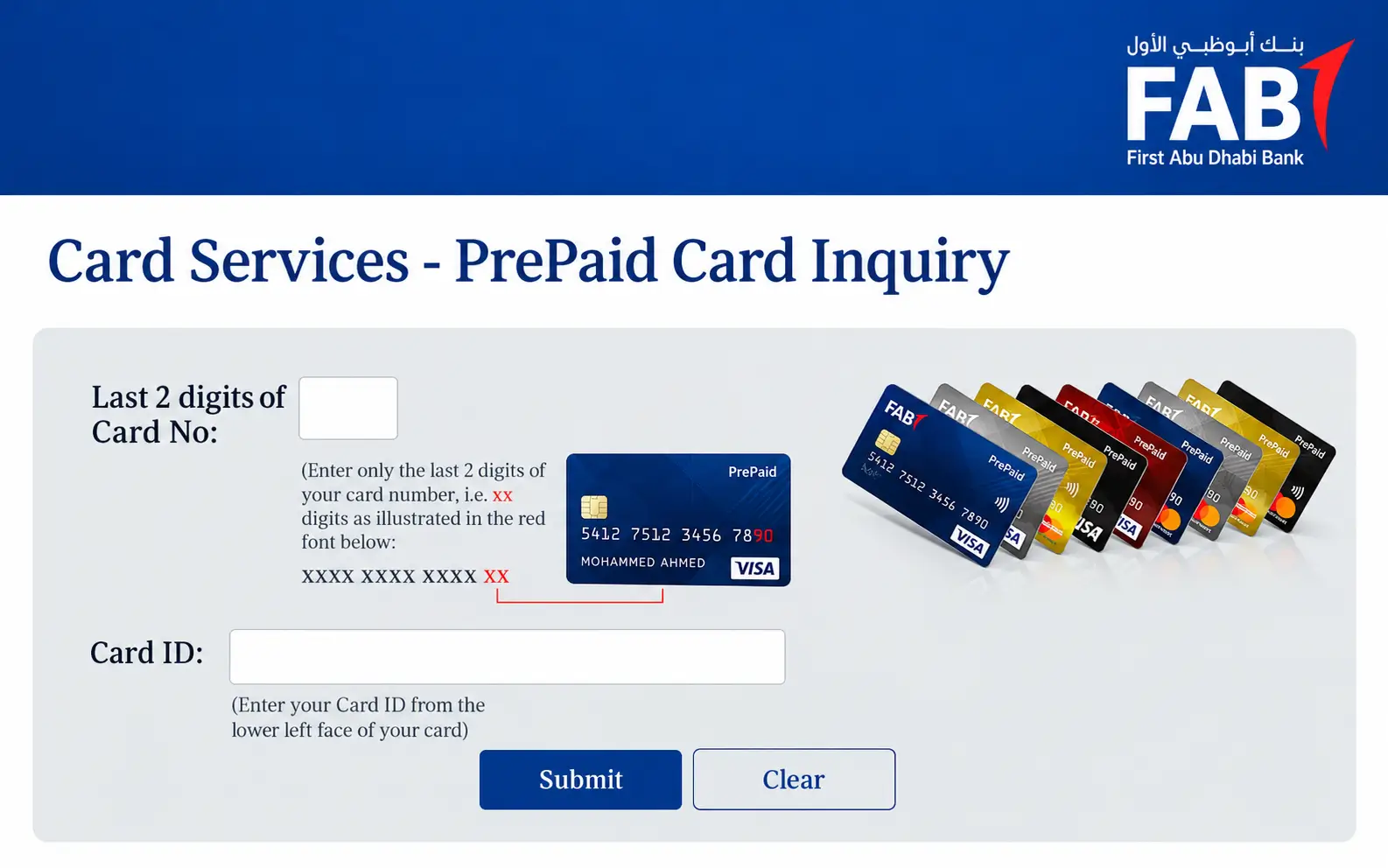
Ratibi is a prepaid Payroll service that enables eligible employees to get their salaries into their cards without an ordinary bank account. For customers already holding their Ratibi card, FAB offers a specific online enquiry page.
Ratibi Balance Check Online
Use the following process:
- Go to the official Ratibi Prepaid Card page.
- Click on the “Ratibi prepaid card balance enquiry” link.
- Access the prepaid card enquiry website.
- Fill in the required card information, such as the card number (last four digits) and Card ID.
- Fill in the CAPTCHA that is shown.
- Click on the information and follow the instructions to display your balance.
By direct portal: Ratibi Prepaid Card Balance Enquiry.
Identifies the prepaid card by requesting specific information from the card. Have your card on hand as you answer the enquiry and take your time to fill in the details.
What If the Ratibi Portal Does Not Work?
If the page doesn’t load or your information won’t be accepted:
- Check that you entered the requested card information correctly.
- Try again after you refresh the page.
- Ensure that the CAPTCHA is completed correctly.
- Use a different browser or a stable internet connection.
- If it persists, please reach out to Ratibi support.
Do not provide a card PIN, password, or one-time security code to an unknown individual who is trying to verify an account balance.
Can You Check a FAB Balance at an ATM?

Sometimes it’s helpful to have an ATM when you aren’t connected to your phone or computer. Availability is dependent upon the type of card and services available with the ATM.
To see your score:
- Go to an appropriate ATM.
- Place your card in the card slot, or follow the machine’s card instructions.
- When prompted for your PIN, enter it.
- If available, choose the “balance enquiry” option.
- Read and do what is indicated on the screen.
- Carry your card and printed receipt when you leave.
In case you have a Ratibi prepaid card, find out what functions the ATM allows while using it. Another official method to check Ratibi balance is with a dedicated online enquiry portal.
Entering PIN in public places. Cover the keypad and refuse help from strangers.
FAB Account Balance vs Ratibi Card Balance
It’s easy to mix these two up because they can both be used to receive or control money. But the balance checking procedure may vary.
| Feature | FAB bank account | Ratibi prepaid card |
| Product type | Current or savings account, depending on the customer | Prepaid payroll card |
| Bank account required | Yes | Not required for the cardholder |
| Online checking | FAB Mobile or Online Banking | Dedicated prepaid card enquiry portal |
| Salary use | Depends on the account and employer arrangement | Designed for payroll payments |
| Transactions | View supported account activity | Review card-related balance and activity through available services |
Do not assume that you can log in to regular account banking if you receive wages on a Ratibi card and don’t have a separate FAB bank account to view the prepaid card’s balance. Utilize FAB’s card enquiry approach.
How to Check Whether Your Salary Has Arrived
Checking your account balance can help you confirm that you have received your salary if you’re waiting for it.
For FAB Bank Account Holders
Examine your transactions and current balance by logging in to FAB Mobile or Online Banking. See the Salary Credit in the transaction history.
For Ratibi Cardholders
Check your balance using the enquiry portal on the prepaid card. In addition, SMS notifications of salary credits are a benefit of the Ratibi card as provided by FAB (where applicable).
Don’t assume that the card is broken if you don’t get your salary. The salary processing time may vary based on the payroll submission and processing of the employer.
If the desired payment is not received, please contact the payroll department at your employer. Check with the bank and/or the bank’s customer service team if the employer certifies that the payment was made, but it has not been received.
What to Do If Your Balance Is Not Showing

A balance enquiry could be unsuccessful due to a temporary technical problem, incorrect information, or an account access problem.
Do the following checks:
- Check your internet connection: A weak connection may prevent the page or app from loading.
- Make sure you have the right service: If you have an account, use FAB Mobile; if you’re using a Ratibi card, use the prepaid enquiry service.
- Verify information entered: Check for typing errors in the login or card information.
- Update app: If using FAB Mobile, update to the latest version (if available).
- Try again later: A temporary service interruption may affect access.
- Use official channels of support: If the problem persists, reach out to a bank’s official channels of support.
FAB releases service availability updates on its digital banking services. If you have a suspicion of a more general problem, you can check the FAB Service Status page.
FAB Customer Support for Balance Enquiries
If you are unable to view your balance via the methods provided, please reach out to FAB via its official channels of support.
If you need assistance related to Ratibi, call these numbers:
| Contact method | Number |
| Ratibi support within the UAE | 600 522 298 |
| Ratibi support from outside the UAE | +971 2 499 6279 |
Please double-check the contact information on the official FAB Contact Us page, as it can change.
Do not give your PIN or password to anyone who has contacted you without your permission. If you think that someone has made unauthorized access to the bank or the transaction may be suspicious, notify the bank immediately using a proper communication method.
Tips for Keeping Your FAB Balance Information Secure
While it’s easy to check your money online, your account and card number must be protected.
- Utilize the official FAB website and mobile application.
- Never give a password, PIN, or one-time password to another person.
- Do not log in on links sent in unsolicited e-mail.
- Plug in to a secure Internet connection when logging into banking.
- Check your transactions frequently.
- Report any suspicious activity as soon as it is noticed.
- When using online banking on a shared computer, sign out.
These measures will help minimise the risk of unauthorised access and will facilitate identification of unusual activity.
Final Thoughts
Once you’ve chosen the right method for FAB balance check, it’s easy to check your balance. Registered account holders can use FAB Mobile and Online Banking; however, Ratibi cardholders can access the prepaid card enquiry portal.
Payments should be made through official banking systems; check bank statements often and keep banking information and card numbers confidential. If the balance or salary credit does not match their expectations, check to see if the data is correct and contact relevant support.
Must Read: NOL Card Balance Check: Official Ways to Check Your Dubai Card Balance
Abu Dhabi Bus Card Balance Check: Easy Ways to Check Hafilat Balance
Frequently Asked Questions
How can I check my FAB balance online?
Log in to FAB Mobile or FAB Online Banking, select your account or eligible card and view the displayed balance.
How can I check my Ratibi balance?
Ensure that you use the official Ratibi prepaid card balance enquiry site that is linked from FAB’s Ratibi page. Enter the desired card details and verify.
Can I check my FAB balance without visiting a branch?
Yes. Registered customers can use FAB Mobile or Online Banking. There is a prepaid card enquiry portal for Ratibi cardholders.
Can I check my salary through a Ratibi card?
Yes. The Ratibi enquiry portal can help you check your card balance. You can also check if any salary credit alerts apply.
Why is my FAB balance not updating?
It may be due to a temporary technical problem, delayed salary processing, incorrect login information and/or a service problem. Repeat as necessary and seek official help if the problem persists.
Can I check my balance at an ATM?
For supported cards, a suitable ATM could provide the cardholder with a balance enquiry option. Services available will vary by card and ATM.
Is the Ratibi prepaid card the same as a FAB bank account?
No. Ratibi is an employee payroll card that can be used to deposit wages into the card without the need for the cardholder to have a bank account.
What should I do if my salary has not arrived?
Always check how much money you have in your account or on your card and your recent activity. Then check with your employer’s payroll department to check the status of the payment. If necessary, please reach out to the bank or Ratibi support.
